People spend much of their phone time inside apps, not browsers. For a publisher, a school, a church, a store or a member organization, an app on the home screen means a direct channel: push notifications, faster access and a more personal experience. If your content already lives in WordPress, you do not need to start from scratch to get there.
I own AppPresser, the app builder that specializes in WordPress, and AlphaWeb builds custom apps on top of it. More than 1,000 apps have been built on the AppPresser platform. This guide explains how WordPress to app development works and how to plan it.
Why build from WordPress
Your WordPress site already has the hard parts: content, users, media, products and the editorial team that keeps them current. An app that reads from WordPress means editors publish once and the content appears on the website and in the app. There is no second CMS to learn and no copy and paste between systems. Site and app are managed in the same place.
How the architecture works
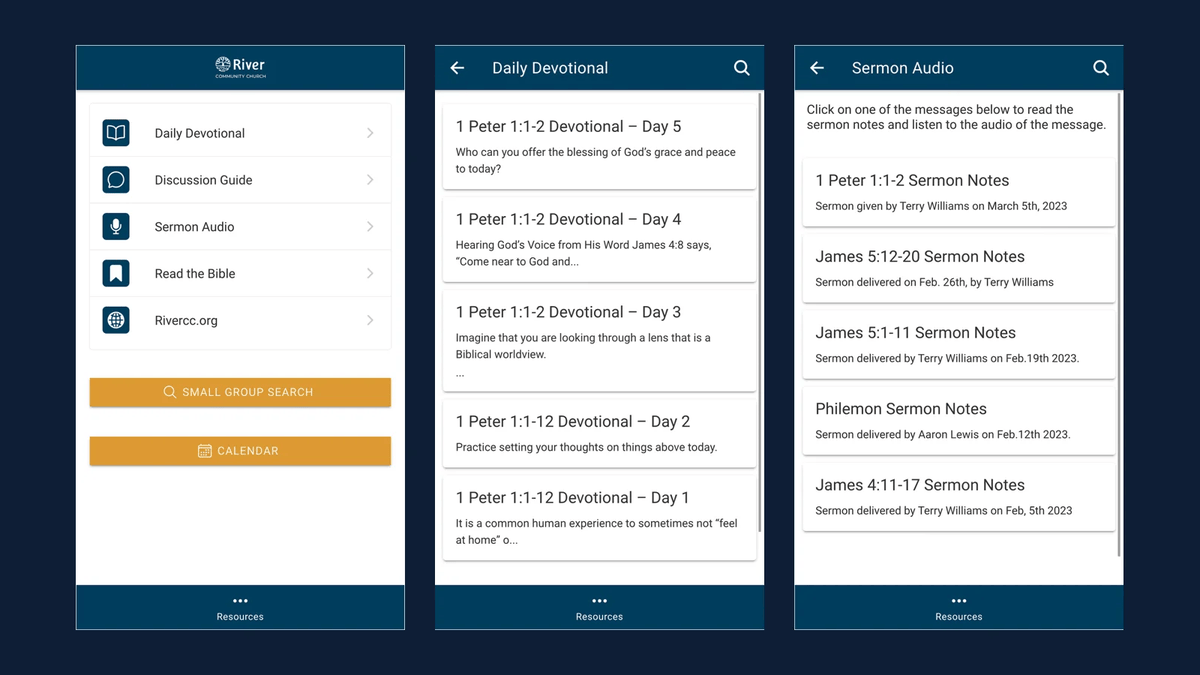
An AppPresser app is a real native app shell for iOS and Android that connects to your WordPress site. A set of WordPress plugins and an app theme handle the integration on the site side, while the app builder controls the design, pages and menus of the app. Content comes from WordPress through the REST API and app specific endpoints, and features like login, the camera, push and offline storage use native device capabilities.
For a developer, that means the WordPress fundamentals still apply. Custom post types with REST support, clean custom fields and well behaved plugins make for a better app. Our WordPress development approach is just as relevant to apps as to websites.
What can go into the app
Building an app this way feels a lot like building a WordPress site. You add pages, build menus and style the design. Common building blocks include:
- Posts, pages and any custom post type, such as events, sermons or recipes
- Login and registration tied to WordPress users
- WooCommerce stores and membership content
- LearnDash courses, BuddyPress or BuddyBoss communities and podcasts
- Camera uploads, maps and check ins, and social sharing
- Translations and right to left languages
- Analytics to understand how people use the app
Design in the builder
AppPresser's visual customizer gives you a live preview while you design, based on the familiar WordPress customizer. The App Page Builder lets you mix several WordPress features on one screen. You can also build test versions for your own device before anything goes to the stores.
When to go custom
Many organizations launch with the builder alone. Others need custom screens, deeper integrations or unique workflows. Because AppPresser is extendable, our team adds custom functionality while keeping the WordPress connection intact. Examples include the Art of Manliness app, the Olelo Community Media app with live channels and on demand video, and the Diversify STEM custom app and site.
Plan the app like a product
An app should not be a copy of your website. Ask what people will do repeatedly on their phones: read the latest news, check a schedule, reorder supplies, listen to an episode, get an alert. Design the app around those few jobs and link to the website for everything else. Apple also expects apps to offer more than a repackaged website, which is another reason to focus on app specific value such as push, offline access and account features.
Timeline for a typical app project
A builder based app can move quickly. A typical path is a short planning phase to define the app's jobs and screens, a design phase in the builder with live previews, a testing phase on real devices with a small group of users, and then store submission. Custom features add development and testing time. Throughout, the website keeps running normally, and content editors do not need to change how they work. After launch, the real work is learning from analytics and feedback, then improving the app in small releases. Treating launch as the start rather than the finish line is what separates apps that grow from apps that fade.
WordPress to app checklist
- Define the top three things users will do in the app
- Confirm content is available through the REST API
- Plan login, protected content and user roles
- Design screens in the builder with live preview
- Set up push notifications and offline content where useful
- Test on real devices before submission
- Prepare store listings, screenshots and privacy details
Frequently asked questions
Do we need mobile developers?
Not to start. If you can manage a WordPress site, you can build an AppPresser app. Our team steps in when you want custom features.
Will updates to our site appear in the app?
Yes. Content published in WordPress shows up in the app without a new store release.
Is it a real native app?
Yes. It is installed from the App Store and Google Play and uses native device features such as push, camera and offline storage.
Learn more on our AppPresser page or request a quote.